
Creating a productive home workspace is essential for anyone working or studying from home. A well-organized environment can boost focus, reduce stress, and improve efficiency. If you’re looking to optimize your workspace, this guide will help you set up an area that supports your best work.
Why Organize Your Home Workspace?
Having a dedicated, organized workspace signals your brain that it’s time to work, helping you separate professional tasks from personal life. In addition, an orderly space reduces distractions and increases comfort, which can enhance your focus and overall productivity.
Choosing the Right Location
Pick a Quiet Spot
Select a space with minimal noise and traffic. If possible, choose a room with a door to help block out background sounds. If a separate room isn’t available, try to find a quiet corner away from household distractions.
Consider Natural Light
Position your workspace near a window to enjoy natural light. Exposure to daylight can improve mood and reduce eye strain. However, avoid glare directly on your screens by adjusting blinds or using curtains.
Essential Furniture and Equipment
Choose a Comfortable Chair
A supportive chair is key to maintaining good posture and preventing discomfort during long work sessions. Look for a chair with adjustable height and lumbar support.
Get a Suitable Desk
Pick a desk that fits your available space and meets your work needs. It should be large enough for your computer, notebooks, and any other essential tools. Adjustable or standing desks are great options to alternate between sitting and standing.
Invest in Quality Lighting
In addition to natural light, use a desk lamp with adjustable brightness. Proper lighting reduces eye strain and keeps you alert throughout the day.
Organizing Your Workspace for Efficiency
Declutter Regularly
Keep only what you need on your desk. Store extra supplies, papers, and gadgets in drawers or shelves. A clean surface helps you focus better.
Use Storage Solutions
Use organizers such as drawer dividers, shelves, or filing cabinets to keep items categorized and easy to find. Label containers to save time searching for materials.
Arrange Your Tools Strategically
Place frequently used items within arm’s reach. Keep less-used tools stored away to minimize distractions and clutter.
Managing Cables and Electronics
Messy cables not only look untidy but can also be distracting. Use cable organizers, clips, or sleeves to keep wires neatly tucked away. Additionally, consider wireless devices to reduce the number of cords on your desk.
Establishing a Routine to Maintain Organization
Set Daily and Weekly Tidying Times
Spend a few minutes at the end of each day to clear your workspace, filing papers and putting items back in place. Use a weekly routine to do a deeper clean and reorganization if needed.
Personalize Your Space Mindfully
While it’s nice to add personal touches like photos or plants, keep decorations minimal to avoid clutter and distractions.
Enhancing Your Environment for Comfort and Productivity
Add Greenery
Plants can improve air quality and provide a calming atmosphere, which may increase productivity.
Control Temperature and Air Quality
Ensure your workspace is well-ventilated and kept at a comfortable temperature to avoid discomfort and maintain focus.
Minimize Noise
Use noise-canceling headphones or play background music or white noise to drown out distracting sounds.
Tips for Staying Focused and Motivated
Use Task Lists and Planners
Keep a planner or to-do list visible in your workspace to organize your tasks and track progress.
Take Regular Breaks
Avoid burnout by scheduling short breaks. Use techniques like the Pomodoro method—work for 25 minutes, then take a 5-minute break.
Limit Distractions
Turn off notifications on your devices or use apps that block distracting websites during work hours.
Final Thoughts
Organizing a productive home workspace takes some planning and upkeep but pays off with increased focus and efficiency. By selecting the right location, investing in comfortable furniture, managing clutter, and maintaining your space daily, you can create an environment that supports your best work every day. Try these tips and adjust them to suit your needs for a workspace that works for you.
Related Posts
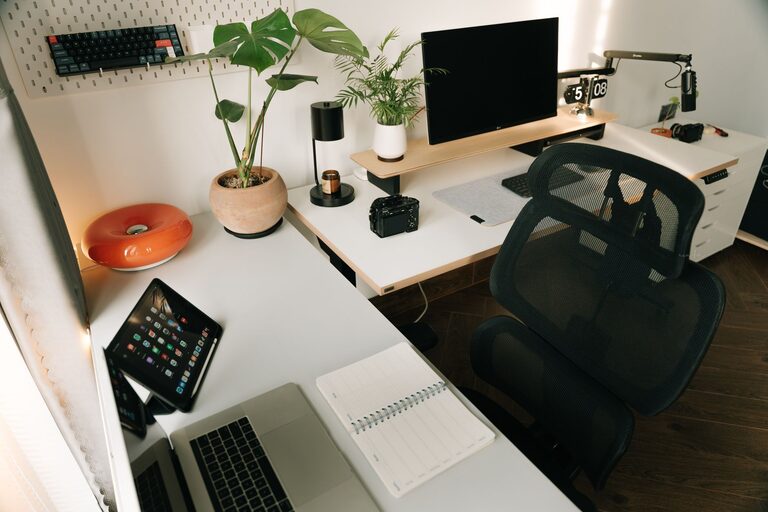
Tips for Organizing Your Home Office to Boost Productivity and Comfort
Creating an organized and comfortable home office is essential for…

Tips for Creating a Cozy and Inviting Home Workspace
Creating a cozy and inviting home workspace is essential for…
Tips for Creating a Productive Home Office Environment
Working from home has become increasingly common, and having a…